This guide removes that confusion by focusing on how settings actually work together in real shooting situations
How to Think Before You Shoot
Before touching any settings, you should always identify three things:
-Whether your subject is moving or still
-You want background blur or full sharpness across the frame
-How much available light you are working with.
These three decisions determine nearly everything about your exposure choices. Once you can answer them quickly, your camera settings become logical rather than random adjustments.
The Exposure Triangle
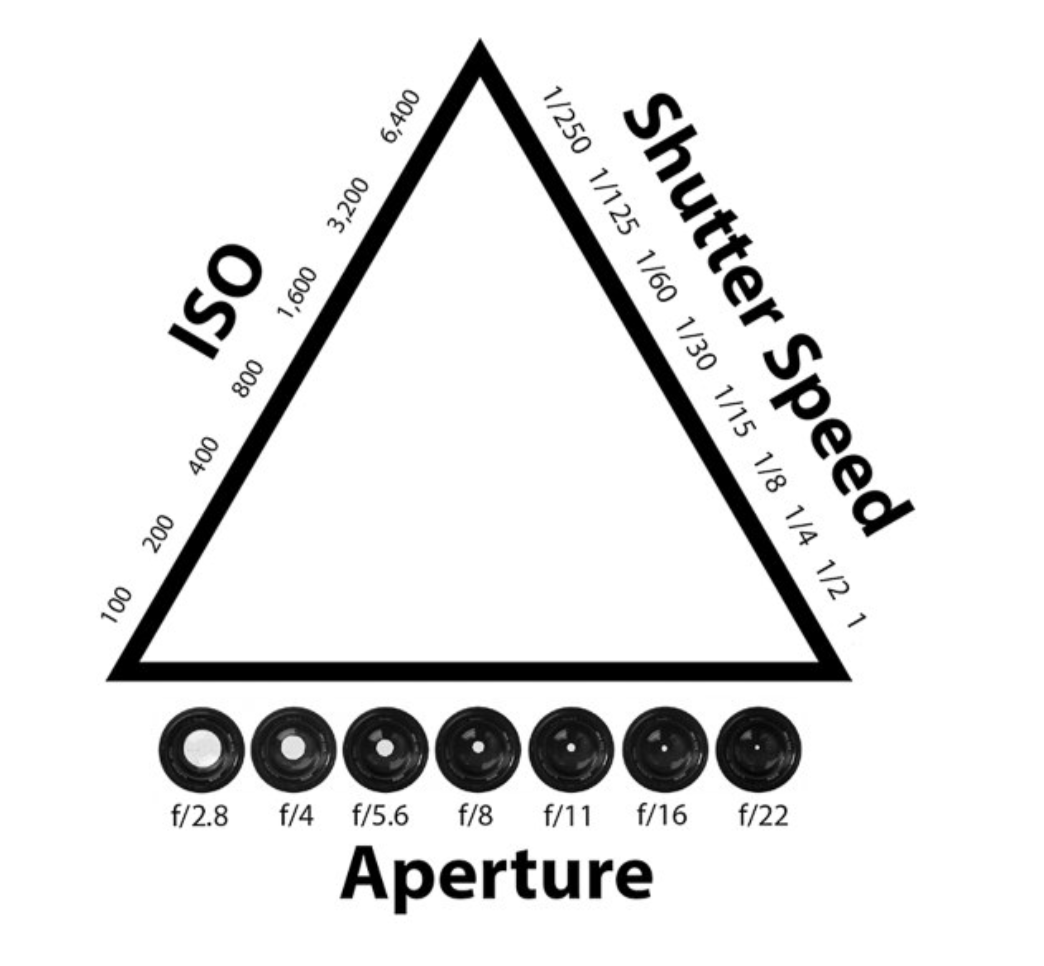
Every image is built from three core settings working together:
shutter speed, aperture, and ISO.
These are not independent controls. Changing one will always force a change in at least one of the others, which is why beginners often feel like they are constantly chasing exposure.
- Shutter Speed controls motion and sharpness by deciding how long light hits the sensor
- Aperture controls depth of field and how much of the image is in focus while also affecting brightness
- ISO controls the sensitivity of the sensor, which adjusts brightness but also affects image noise and overall quality
The key idea is balance. There is no single “correct” setting for exposure.
There is only the correct combination for the situation you are shooting in and the look you want to achieve.
Shutter Speed — Motion and Sharpness
Shutter speed is one of the most important settings because it determines whether your image is sharp or unusable due to motion blur. It controls how long the camera sensor is exposed to light, which directly affects how movement is captured.
Fast shutter speeds freeze motion completely and are essential for fast subjects like cars, sports, or active movement
Slower shutter speeds allow motion blur, which can be either a mistake or a creative effect depending on intention
Typical real-world ranges:
1/1000 → freezing fast action like cars or jumping subjects
1/500 → walking people or moderate movement
1/250 → general handheld safe zone
1/125 → slower portraits with some movement risk
1/60 → borderline handheld stability
Below 1/60 → usually requires tripod or intentional motion blur
A critical rule that prevents most beginner blur is the focal length rule. Your shutter speed should generally not be slower than 1 divided by your focal length when shooting handheld. For example, at 70mm you should aim for at least 1/70 to maintain sharpness.
Most beginner blur is caused by shutter speed being too slow, not focus issues
Faster shutter speeds reduce motion but require more light or higher ISO
Aperture — Depth of Field and Creative Control
Aperture controls how wide your lens opens, which affects both brightness and depth of field. Depth of field is how much of your image appears in focus from front to back, and this is one of the most visually important creative tools in photography.
Wide aperture (low f-number) creates strong background blur and isolates the subject
Narrow aperture (high f-number) keeps more of the scene in focus
Typical ranges:
f/1.8–f/2.8 → strong subject separation, cinematic portraits
f/4 → soft background blur with more stability
f/5.6–f/8 → balanced sharpness and depth
f/11+ → full scene sharpness, ideal for landscapes
Aperture is often misunderstood as purely aesthetic, but it also controls how forgiving your focus is. Wider apertures require more precise focusing because the depth of field becomes very shallow.
Wider apertures create stronger visual separation but increase focus difficulty
Smaller apertures increase depth but reduce background blur
ISO — Brightness and Image Quality
ISO adjusts how sensitive your camera sensor is to light. It does not physically add light; instead, it amplifies the signal from the sensor, which is why higher ISO values introduce noise.
Low ISO produces clean, high-quality images with maximum detail
High ISO allows shooting in darker environments but reduces image quality
Typical ranges:
ISO 100–200 → bright daylight conditions
ISO 200–400 → shade or overcast lighting
ISO 800–1600 → indoor environments
ISO 1600+ → low light or night shooting
ISO should almost always be adjusted last because it does not control motion or depth, only brightness and image quality.
Beginners often overuse ISO when shutter or aperture adjustments would be more appropriate.
ISO is a compensation tool, not a primary exposure tool
Higher ISO = more noise, especially in shadows
How to Set Exposure in the Correct Order
Instead of randomly adjusting settings, use a structured approach that matches how professionals actually shoot in real time.
This prevents overthinking and reduces exposure mistakes.
Decide shutter speed based on motion and sharpness requirements
Choose aperture based on depth of field and creative intent
Adjust ISO to balance overall brightness
This order works because it prioritises what cannot be fixed later. Motion blur and depth of field cannot be corrected in editing, but brightness often can be adjusted slightly.
Motion first (shutter)
Look second (aperture)
Brightness last (ISO)
Shooting in Real Conditions
Lighting conditions determine how far you can push each setting, and understanding this is what separates inconsistent beginners from confident shooters.
Bright Sun
Strong light allows fast shutter speeds and low ISO, but often requires careful exposure control to avoid highlights being blown out.
- ISO 100
- Fast shutter speeds (1/1000+)
- Aperture adjusted for desired depth of field
Shade or Overcast
Light becomes softer and more even, which is ideal for portraits but requires slightly more exposure compensation.
- ISO 200–400
- Moderate shutter speeds
- Flexible aperture control
Indoors
Lighting becomes limited and inconsistent, requiring more balancing between ISO and shutter speed.
- ISO 800–1600+
- Wider apertures for more light
- Slower shutter speeds if needed
Night
At night, you are working at the limits of your camera, where every setting affects image quality significantly.
- High ISO often required
- Wide apertures essential
- Tripod or stabilisation often needed
White Balance and Kelvin Temperature
White balance controls the colour tone of your image and has a major impact on skin tones and overall mood. Kelvin allows manual control over this instead of relying on automatic adjustments that can shift between shots.
Lower Kelvin values create warmer tones
Higher Kelvin values create cooler tones
Typical ranges:
- 3000–4000K → warm indoor lighting
- 5000–6000K → natural daylight balance
- 6500–7500K → cooler environments or shade
Consistency is more important than perfection, especially when shooting a series of images that need to match.
- Kelvin prevents inconsistent colour shifts between frames
- Essential for portraits and professional work
Focus Modes and Accuracy
Focus determines what part of your image is sharp, and incorrect focus is one of the most common reasons images fail even when exposure is correct.
- AF-S (Single focus) locks focus once and is best for still subjects like portraits or static scenes
- AF-C (Continuous focus) tracks movement and is essential for cars, walking subjects, and unpredictable motion
Focus area selection is equally important because it determines where the camera is trying to focus within the frame.
- Single point focus gives maximum control and accuracy
- Zone and wide modes allow more automation but less precision
Beginners should prioritise single point focus to ensure intentional sharpness placement.
Drive Modes and Shooting Speed
Drive modes control how many frames your camera captures when the shutter is pressed, which directly affects your ability to capture timing-based moments.
- Single shot mode captures one image per press and is best for controlled compositions
- Burst mode captures multiple frames rapidly and is useful for action, movement, or changing expressions
- Burst mode increases chances of capturing peak moments
- Single shot encourages more deliberate composition
Metering Modes and Light Reading
Metering determines how your camera evaluates brightness across the scene.
Understanding this helps you avoid overexposed skies or underexposed subjects.
- Evaluative (Matrix) metering reads the entire scene and is best for general use
- Centre-weighted prioritises the middle of the frame
- Spot metering measures a very small area for precise exposure control
For beginners, evaluative metering provides the most consistent results across different environments.
RAW vs JPEG Explained
File format affects how much flexibility you have after the photo is taken.
- RAW files retain all sensor data and allow extensive editing control
- JPEG files are compressed and processed in-camera, reducing flexibility but making files smaller and easier to share
- RAW preserves highlights and shadows better
- JPEG limits recovery in post-processing
For learning and professional development, RAW is strongly recommended paired only with a professional editing software (eg. Lightroom)
Autofocus vs Manual Focus
Autofocus systems are highly advanced and should be used in most situations because they are faster and more accurate than manual focusing in dynamic environments.
Manual focus is useful in specific situations where autofocus struggles or precision is more important than speed.
- Autofocus is ideal for portraits, events, and general shooting
- Manual focus is best for low light, macro, or astrophotography
Camera Setup and Workflow
A proper setup ensures consistency before shooting begins and prevents unnecessary mistakes during a session.
Use manual or aperture priority mode for control
- Shoot in RAW for maximum editing flexibility
- Use Kelvin white balance instead of auto for consistency
- Set autofocus to single point for accuracy
- Choose appropriate drive mode based on subject movement
- Learn to adjust ISO, shutter speed, and aperture quickly without menus
- Familiarity with controls improves speed and consistency
Real-World Example Settings (Practical Starting Points)
These are not strict rules, but reliable starting points you can adjust based on lighting and style.
Portrait Photography
Designed for subject separation and flattering depth of field.
- Shutter Speed: 1/200–1/500 (depending on movement)
- Aperture: f/1.8–f/2.8 for blur, f/4 for more consistency
- ISO: 100–400 in daylight, higher indoors
- Focus Mode: AF-S or AF-C depending on movement
- Focus Point: Single point on the eyes
Goal: sharp subject with soft, controlled background separation
Car Photography (Static or Rolling)
Designed for sharp detail and controlled motion depending on style.
Static shots:
- Shutter: 1/250–1/500
- Aperture: f/4–f/8
- ISO: 100–400
Rolling shots:
- Shutter: 1/60–1/125 (for motion blur effect)
- Aperture: f/2.8–f/5.6
- ISO: adjusted for exposure
- Focus Mode: AF-C
- Focus Point: tracking or single point depending on subject
Goal: sharp car with intentional motion or cinematic blur
Night Photography
Designed for low light control and maximum light capture.
- Shutter Speed: 1/30–several seconds (tripod recommended)
- Aperture: f/1.8–f/2.8
- ISO: 800–6400 depending on darkness
- White Balance: 3500–4500K for natural night tones
- Focus Mode: manual focus often preferred
Goal: balanced exposure with controlled noise and clean highlights
Quick Camera Settings Cheat Sheet
A fast reference you can return to when shooting.
Exposure Order
- Set shutter speed first (motion control)
- Set aperture second (depth of field)
- Set ISO last (brightness balance)
Core Settings Guide
- Bright daylight: ISO 100, fast shutter, mid aperture
- Shade: ISO 200–400, flexible shutter
- Indoors: ISO 800–1600+, wide aperture
- Night: high ISO, slow shutter, tripod if possible
Focus Rules
- AF-S = still subjects
- AF-C = moving subjects
- Single point focus = most accurate option
Key Reminders
- Shutter speed prevents blur
- Aperture controls depth and style
- ISO is your last adjustment
- RAW gives maximum editing control
Final Thoughts
Photography is not about memorising settings or constantly adjusting dials without understanding. It is about recognising what is happening in front of you — light, movement, and depth — and responding with controlled, intentional choices.
Once you understand how shutter speed, aperture, ISO, focus, and white balance work together as one system, your camera stops feeling unpredictable. You begin to anticipate results before you press the shutter, and that is where consistency comes from.
Progress in photography is not sudden. It builds through repetition, awareness, and understanding how each decision affects the final image. The more you shoot with intention rather than guesswork, the faster your results improve.